Appearance
Assigning a Name to a Macro
Digital Works can represent macros in the Parts Centre in two different ways. You can either display a list of macros using their actual filename, or you can use an 'alias' name. For example, a macro might be saved to disk using the name 74HC00. However, you may want to give a more descriptive name such as 'Quadruple 2 input NAND gates'.
To assign a name to a macro, select Tools → Options and then Name Macro from the main menu. This will open the name macro window as shown below.
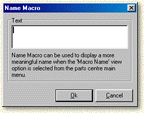
Type in the name of the macro, without a carriage return, in the text box. You can also quickly name a macro by right clicking on an annotation object and selecting the name macro option.