Appearance
The Memory Contents Window
This window is used to edit the contents of a memory device. It also enables you to view the state of memory when a circuit is being run. Memory contents can be displayed as either binary or hexadecimal numbers.
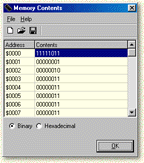
Editing Memory
To change the contents of memory, press the return key or click the left mouse button on a highlighted location. Type in the required number and press the return key again to save the change. When editing a memory location, pressing enter or using the cursor keys will save the edited number. To abort an edit, click the mouse outside the highlighted area.
The Toolbar
| Icon | Action | Description |
|---|---|---|
 | Clear | Clears all memory contents to zero |
 | Open | Opens a previously saved memory map file |
 | Save | Saves the current memory contents to a file |