Appearance
Grid Setup
The grid setup window allows you to change the display and snap characteristics of the Digital Works workspace grid. You can open the grid setup window from the main menu by selecting View then Grid Setup...
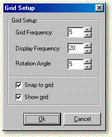
The grid frequency defines the number of 'snap to' pixels on the grid. The default is for a five pixel grid frequency. When an object is moved around, the difference between each placement will be five pixels, as long as snap to grid is selected. If snap to grid is not selected, then the objects can be moved independently of the grid.
The display frequency defines how the grid is shown on the workspace. For example, you may want to snap every five pixels, but only display grid points every twenty pixels.
The rotation angle is the 'snap' angle used when an object is being rotated.