Appearance
Sequence Generator

The sequence generator object can be used to provide a user definable sequence of 1s and 0s. The object displays a Light Emitting Diode (LED) indicating the state of the current cycle — red for high, white for low.
Placing the Device
To place a sequence generator into a circuit workspace, select the icon and move the mouse into the active view. Press the left mouse button to fix the device at the required location.
Editing the Bit Sequence
By selecting the object with the object selector tool and right clicking the mouse, the pop up option to edit the bit sequence of the device is made available as shown below.
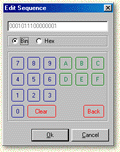
A 64 bit sequence can be entered in either binary or hexadecimal. The sequence entered is cyclic.
Text Label
You can edit the text label of the device by right clicking on the object and selecting the Text... option. Type the required text into the text box and then select Text Style to change the placing of the text to right, left, top or bottom of the device. To display the text with an overbar, select overbar from the Edit Text Box.
Logic History
Select Add to Logic History to record the output from the sequence generator to the Logic History Window. To view the results, select Logic History from the Tools menu.