Appearance
Assigning a Datasheet to a Macro
After creating a macro, you may want to attach a datasheet to enable users to access information about the macro object. For example, information on how a counter works. It is particularly useful when creating Integrated Circuits, as you can attach the chip supplier's datasheet to the object. You can even include links to web sites or use Windows help files.
To attach a datasheet to a macro object, select Tools → Options and then Attach Datasheet… from the main menu. This will invoke the assign datasheet window, as shown below.
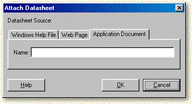
Next, choose the datasheet source e.g. Web Page or Application Document.
Application Document
Type in the name of the document file you wish to use. Examples include:
- Text files (*.txt)
- Word files (*.doc, *.rtf etc)
- Adobe Acrobat files (*.pdf)
Select OK. If the filename is not fully qualified with a pathname, then Digital Works will search in its Datasheet sub folder for the file.
Web Page
Type in the name of the web page you wish to use. The page must have the form http://www.wherever/page.htm. Select OK.